
Index

.png?width=52&height=26&name=Star%20icon%20for%20features%20(for%20RN).png)
1. New in FL3XX: Rule-based flight setup
What's new:
You asked, we deliver! With this update, FL3XX now supports two approaches to setting up bookings for Dispatch:
- Manual setup - a dispatcher opens each flight and configures it directly.
- Rule-based automatic setup - the system evaluates predefined rules and applies the correct configuration automatically, based on conditions such as aircraft type, route, customer, workflow, and more.
Both approaches share the same underlying setup options. The newly introduced ability to add rules allows you to preconfigure and automate tasks that dispatchers would otherwise need to perform manually each time.
Example:
For domestic flights within the US, a US-based operator does not need to obtain as many permits as for an international flight. For international flights, however, it is important that nothing is overlooked. It can therefore be configured so that permits for international flights are automatically assigned to Dispatch.
→ Exemplary Rule:
If both the Departure Airport Country and the Arrival Airport Country are not the United States, all permits are assigned to Dispatch.
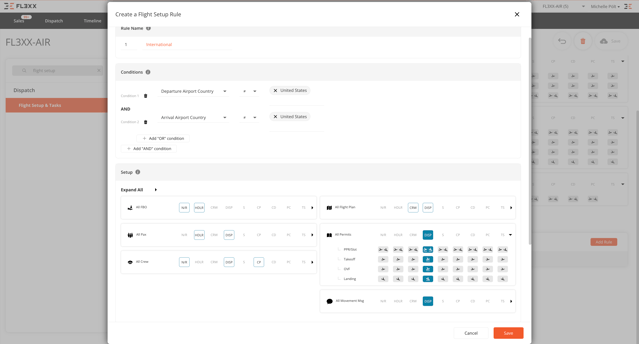
This feature is available to all operators with a FL3XX subscription. Learn more about manual and automatic flight setup in our Knowledge Base.

2. Configurable warning thresholds for qualification expiry
What's new:
Tired of your 90d takeoffs and landings always being yellow? Now you can configure your own thresholds for recency alerts and warnings!
Recency and proficiency items (such as 90-day landings or approach recency) now use separate, configurable warning thresholds from standard qualifications. This prevents short-cycle recency items from displaying long-lasting, constant warnings and ensures alerts remain meaningful and consistent across the system.
Recency alerts are aligned across:
-
Staff Page
-
Dispatch & Timeline
-
Crew App
-
Licenses Page
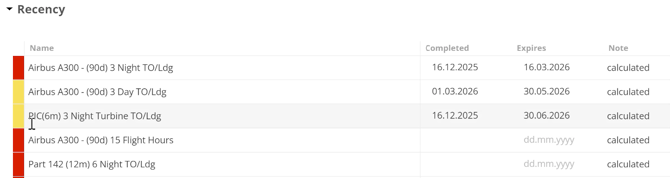
Different recency status colors indicate if the item is valid (white), due to expire (yellow), or expired/not satisfied (red).
This feature is available to all operators with a FL3XX subscription. Find out more about how to configure warning thresholds, what different recency status colors mean and more on our Knowledge Base.
3. Roster training & qualification events enhancements
What's new:
Roster training and qualification events have just received a major enhancement in FL3XX. You can now link roster events to qualifications for controlled, semi-automatic issue and expiry recalculation. Planned future training is also now surfaced across the Staff page, Licenses Matrix, and reports.
In addition, qualification updates only occur after explicit user confirmation and only for past events. The enhancement also improves data stability and predictability after training events are completed.
This feature is available to all operators with a FL3XX subscription. Learn more about how training events are linked to qualifications and how upcoming training is displayed across Staff, Licenses, Reports, and Mobile in our Knowledge Base.
4. New Pricing Engine conditions
The FL3XX Pricing Engine has received 2 new conditions:
- Pax
- Applicability: Modules (Per Leg)
- Description: Define conditions based on passengers added to the flight. The system checks all passengers present in the Pax list.
- Pax Lead
- Applicability: Modules (Per Leg)
- Description: Define conditions based on the lead passenger (the first passenger in the Pax list).
This feature is available to all operators with a FL3XX subscription that includes the FL3XX Pricing Engine. Find out more about how to set up rules for the FL3XX Pricing Engine in our Knowledge Base.

5. Mobile Updates
iOS Crew & Dispatch Apps — Ops Team Filter and Multi-Aircraft Selection
In the Crew and the Dispatch App for iOS, users can now filter their schedule by Ops Team by selecting one or more teams to automatically display only the aircraft assigned to those teams. Aircraft selection has also been enhanced to allow multiple aircraft to be chosen simultaneously, and the selected filters persist across sessions until manually cleared. Furthermore, the filter order has been updated to match the web app: Ops Team → Aircraft → Airport.
iOS Crew App — Improved Offline Calendar Experience
The FL3XX Crew App now offers a significantly improved offline experience for the calendar. Previously, the app only cached data for the current month plus a ±14-day window, meaning crew members viewing older months while offline would often see an empty calendar despite having previously viewed those flights.
With this update, the app persistently stores complete calendar months in a local database as soon as the user opens them. The calendar always loads from local storage first, eliminating connection-check delays and blank screens. When connectivity is restored, the app syncs in the background and refreshes only if the data has changed.
The FL3XX Mobile suite is available to all operators with a FL3XX subscription. Check out the following links for all updates available for our mobile apps:


6. Bug Fixes & Stability Improvements
We are continuously working to improve FL3XX for you.