
Crew
iOS Crew v2.11.42
Stability improvements and minor bug fixes only.
iOS Crew v2.11.41
Crew app users can now edit notes and upload attachments directly from the Customs and Migration tabs in flight details without having to switch to the web app. A new Customs Info screen also brings arrival and departure customs details together in one place. Updates, including offline changes, sync automatically and follow the same permissions as the existing Service Status Update feature: in the Crew app, edits are limited to services assigned to the crew, while Dispatch app users can edit all services. This gives crews and dispatchers a faster way to keep customs and migration paperwork up to date, wherever they are.
The Crew app now shows documents in the "My Documents" tab using the same folder structure as "All Documents" tab, instead of displaying one long, flat list. Users can simply tap a folder to see its contents, just as they would in the web app. This new structure makes it much easier to find a specific document when many files have been shared with a user.
iOS Crew v.2.11.40
Show closed discrepancies
The FL3XX Crew App now displays closed (corrected) discrepancies alongside open ones in the HIL/MEL tab, including items corrected within the last 30 calendar days. Open and closed items are organized into clearly labeled "OPEN" and "CLOSED" sections, with each closed item displaying its correction date. This enhancement supports compliance with 14 CFR Part 135.65, Part 121 Subpart T, and A008 Operational Control requirements, giving pilots and dispatchers a complete view of aircraft discrepancies before departure without having to leave the mobile app.
Text fields & bottom sheet editor
All text fields across the App can now be expanded to display their full content. In addition, a bottom sheet editor is opened on tap, replacing the previous inline editing behavior.
Recency display
The Recency section now includes qualification-derived conditions such as EFVS and airport recency, which were previously only visible in the web app. The app now reads data from the same sources as the web app, giving crew members a complete view of their recency status without having to switch platforms. If the same condition appears in both assignments and qualifications, it is displayed only once. This change brings full parity between the Crew App and the web app for recency visibility.
Calendar offline experience
The App now offers a significantly improved offline calendar experience. With this update, the app persistently stores complete calendar months in a local database as soon as they are opened by the user. The calendar always loads from local storage first, eliminating connection-check delays and preventing blank screens. When connectivity is restored, the app synchronizes data in the background and refreshes the calendar only if changes are detected. This represents a significant improvement over the previous behavior, where the app cached only the current month plus a ±14-day window. As a result, crew members viewing older months while offline would often see an empty calendar, even if they had previously viewed those flights.
iOS Crew v2.11.38
Ops Team Filter and Multi-Aircraft Selection
Users can now filter their schedule by Ops Team by selecting one or more teams to automatically display only the aircraft assigned to those teams. Aircraft selection has also been enhanced to allow multiple aircraft to be chosen simultaneously, and the selected filters persist across sessions until manually cleared. Furthermore, the filter order has been updated to match the web app: Ops Team → Aircraft → Airport.
Improved Offline Calendar Experience
In addition, the FL3XX Crew App now offers a significantly improved offline experience for the calendar. Previously, the app only cached data for the current month plus a ±14-day window, meaning crew members viewing older months while offline would often see an empty calendar despite having previously viewed those flights.
With this update, the app persistently stores complete calendar months in a local database as soon as the user opens them. The calendar always loads from local storage first, eliminating connection-check delays and blank screens. When connectivity is restored, the app syncs in the background and refreshes only if the data has changed.
iOS Crew v2.11.37
ReFuelEU
We have extended the Post Flight → Fuel section on both iOS and Android to fully align with ReFuelEU Aviation requirements for flights departing from EU airports.
When the operator setting "Enable Post Flight Extra Fuel Fields" is ON, new grouped fields appear: Safety Fuel Information (planned/actual uplifted, tankering categories with multi-select, operational consumption) and Fuel Reporting Data [Sustainable Aviation Fuel (SAF) purchases including provider, batch, amount, eligible details, feedstock, emissions, claimed schemes].
Key enhancements include automatic copy of uplift data for EU departures, visual EU flag icon + tooltip, per-flight compliance badge with color-coded uplift percentage (yellow <95 %, red <90 %) and penalty display/message, plus audit support via comment field and multiple attachments.
All fields respect aircraft Fuel Burn Units (FBU), support full offline editing/sync/conflict resolution, bi-directional real-time sync with web, and calculated fields using backend logic (last known offline).
This delivers precise compliance tracking, better audit readiness, and consistent data across platforms - directly addressing growing regulatory needs for EU operations.
Airport Recency
We have introduced automated Airport Recency tracking to help crews and dispatchers maintain airport-specific qualifications effortlessly. When enabled in Company Settings, the system automatically updates recency based on landings, take-offs, and SIM duties, while displaying required briefings per crew member/role in the Crew section of Flight Details.
In the Crew app, users can view their own "Airport Briefing" items (e.g., briefing lines with toggles for acknowledgment, attached documents for viewing/downloading, and status colors: red for pending, yellow for flight acknowledged but briefing pending, green for completed). The Dispatch app provides a full crew overview with upload capability on the web and view-only access on mobile.
Features include 2-hour pre-flight push notifications that route directly to the Crew tab, color-coded bubbles/tooltips across apps and web, and secure document management - online only.
Status DDL Options
We have replaced the abbreviated status labels in the dropdown lists (DDL) across all relevant sections of the Crew and Dispatch apps with full, intuitive English titles in the following fixed order to improve readability and reduce confusion during busy operations:
-
Not Available (NA),
-
Not Required (NR),
-
Canceled (CNL),
-
To-Do (DO),
-
On Hold (HOLD),
-
Requested (REQ), and
-
Confirmed (OK).
iOS Crew v2.11.36
Stability improvements and minor bug fixes only.
iOS Crew v2.11.35
Service handling has been enhanced to be fully available offline. Moreover, users can now edit notes, add remarks, and upload attachments for services such as handlers, hotels, transport, catering, and more directly in the app. Furthermore, all Flight tabs now support pull-to-refresh and auto-refresh when the app is resumed, ensuring fresh backend data even if web sockets fail. This updates tab content, header statuses, and related items such as expenses smoothly, without glitches or unnecessary alerts.
Dispatch
iOS Dispatch v2.11.42
Stability improvements and minor bug fixes only.
iOS Dispatch v2.11.41
Dispatch app users can now edit notes and upload attachments directly from the Customs and Migration tabs in flight details without having to switch to the web app. A new Customs Info screen also brings arrival and departure customs details together in one place. Updates, including offline changes, sync automatically and follow the same permissions as the existing Service Status Update feature: in the Crew app, edits are limited to services assigned to the crew, while Dispatch app users can edit all services. This gives crews and dispatchers a faster way to keep customs and migration paperwork up to date, wherever they are.
iOS Dispatch v2.11.40
Show closed discrepancies
The FL3XX Dispatch App now displays closed (corrected) discrepancies alongside open ones in the HIL/MEL tab, including items corrected within the last 30 calendar days. Open and closed items are organized into clearly labeled "OPEN" and "CLOSED" sections, with each closed item displaying its correction date. This enhancement supports compliance with 14 CFR Part 135.65, Part 121 Subpart T, and A008 Operational Control requirements, giving pilots and dispatchers a complete view of aircraft discrepancies before departure without having to leave the mobile app.
Text fields & bottom sheet editor
All text fields across the App can now be expanded to display their full content. In addition, a bottom sheet editor is opened on tap, replacing the previous inline editing behavior.
Calendar offline experience
The App now offers a significantly improved offline calendar experience. With this update, the app persistently stores complete calendar months in a local database as soon as they are opened by the user. The calendar always loads from local storage first, eliminating connection-check delays and preventing blank screens. When connectivity is restored, the app synchronizes data in the background and refreshes the calendar only if changes are detected. This represents a significant improvement over the previous behavior, where the app cached only the current month plus a ±14-day window. As a result, crew members viewing older months while offline would often see an empty calendar, even if they had previously viewed those flights.
iOS Dispatch v2.11.38
Ops Team Filter and Multi-Aircraft Selection
Users can now filter their schedule by Ops Team by selecting one or more teams to automatically display only the aircraft assigned to those teams. Aircraft selection has also been enhanced to allow multiple aircraft to be chosen simultaneously, and the selected filters persist across sessions until manually cleared. Furthermore, the filter order has been updated to match the web app: Ops Team → Aircraft → Airport.
iOS Dispatch v2.11.37
ReFuelEU
We have extended the Post Flight → Fuel section on both iOS and Android to fully align with ReFuelEU Aviation requirements for flights departing from EU airports.
When the operator setting "Enable Post Flight Extra Fuel Fields" is ON, new grouped fields appear: Safety Fuel Information (planned/actual uplifted, tankering categories with multi-select, operational consumption) and Fuel Reporting Data [Sustainable Aviation Fuel (SAF) purchases including provider, batch, amount, eligible details, feedstock, emissions, claimed schemes].
Key enhancements include automatic copy of uplift data for EU departures, visual EU flag icon + tooltip, per-flight compliance badge with color-coded uplift percentage (yellow <95 %, red <90 %) and penalty display/message, plus audit support via comment field and multiple attachments.
All fields respect aircraft Fuel Burn Units (FBU), support full offline editing/sync/conflict resolution, bi-directional real-time sync with web, and calculated fields using backend logic (last known offline).
This delivers precise compliance tracking, better audit readiness, and consistent data across platforms - directly addressing growing regulatory needs for EU operations.
Airport Recency
We have introduced automated Airport Recency tracking to help crews and dispatchers maintain airport-specific qualifications effortlessly. When enabled in Company Settings, the system automatically updates recency based on landings, take-offs, and SIM duties, while displaying required briefings per crew member/role in the Crew section of Flight Details.
In the Crew app, users can view their own "Airport Briefing" items (e.g., briefing lines with toggles for acknowledgment, attached documents for viewing/downloading, and status colors: red for pending, yellow for flight acknowledged but briefing pending, green for completed). The Dispatch app provides a full crew overview with upload capability on the web and view-only access on mobile.
Features include 2-hour pre-flight push notifications that route directly to the Crew tab, color-coded bubbles/tooltips across apps and web, and secure document management - online only.
Status DDL Options
We have replaced the abbreviated status labels in the dropdown lists (DDL) across all relevant sections of the Crew and Dispatch apps with full, intuitive English titles in the following fixed order to improve readability and reduce confusion during busy operations:
-
Not Available (NA),
-
Not Required (NR),
-
Canceled (CNL),
-
To-Do (DO),
-
On Hold (HOLD),
-
Requested (REQ), and
-
Confirmed (OK).
iOS Dispatch v2.11.36
Stability improvements and minor bug fixes only.
iOS Dispatch v2.11.35
Service handling has been enhanced to be fully available offline. Moreover, users can now edit notes, add remarks, and upload attachments for services such as handlers, hotels, transport, catering, and more directly in the app. Furthermore, all Flight tabs now support pull-to-refresh and auto-refresh when the app is resumed, ensuring fresh backend data even if web sockets fail. This updates tab content, header statuses, and related items such as expenses smoothly, without glitches or unnecessary alerts.
Sales
iOS Sales v4.5.36
Stability improvements and minor bug fixes only.
iOS Sales v4.5.35
Stability improvements and minor bug fixes only.
iOS Sales v4.5.34
The FL3XX Sales app now includes a "Date TBA" toggle for quoting flight legs, allowing you to mark departure and arrival times as "To Be Announced" when details are not yet known. Like the web app, this keeps early quotes flexible on mobile. Departure time changes now automatically shift subsequent legs to prevent overlaps. You can also add custom, color-coded tags to quotes, with multiple tags supported and synced to the web app for faster organization.Owner
iOS Owner v3.5.26
Stability improvements and minor bug fixes only.
iOS Owner v3.5.25
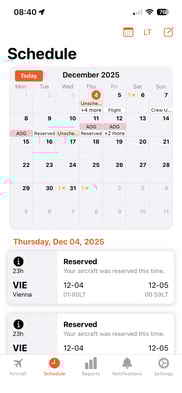
The Owner app has received a significant enhancement: it now includes a new calendar view, giving owners a clear overview of aircraft availability, location, and key activities for selected dates - all in one place. This update also brings overall UI improvements across the app, along with stability enhancements and minor bug fixes.
iOS Owner v3.5.24
Stability improvements and minor bug fixes only.
iOS Owner v3.5.23
Stability improvements and minor bug fixes only.