

About
The U.S. Electronic Advance Passenger Information System (eAPIS) is an online portal managed by U.S. Customs and Border Protection (CBP) that facilitates the secure transmission of passenger and crew information for international flights entering or departing the United States.
Required by federal law, eAPIS ensures compliance with immigration, security, and customs regulations by pre-screening individuals on board aircraft.
Operators are mandated to submit detailed manifests at least one hour before departure, allowing CBP to evaluate and process the data in advance. This system enhances border security while streamlining travelers' and air operators' entry and exit processes.
How It Works
Prerequisites:
1) Private eAPIS requires a Sender ID. Commercial eAPIS requires a CBP Carrier Code
2) For Commercial flights, you must always use the commercial aviation flight number format. CBP recommends four digits, with your ICAO or IATA designator (if you have one) preceding the number.
- Examples: 1234, AA1234 (IATA), DLH1234 (ICAO).
The US eAPIS is situated in the Dispatch module (1), in the Migration panel (2).
It appears automatically (3), if the flight departs, arrives, or overflies the United States For Commercial flights, this includes any flight path over the continental U.S., Hawaii, or Alaska based on the great circle route.
FL3XX automatically recognizes which version of eAPIS (Private or Commercial) applies based on the flight workflow. Commercial U.S. eAPIS is filed for: N (Non‑Scheduled) and S (Scheduled). Our Workflow KB can help you define these rules.
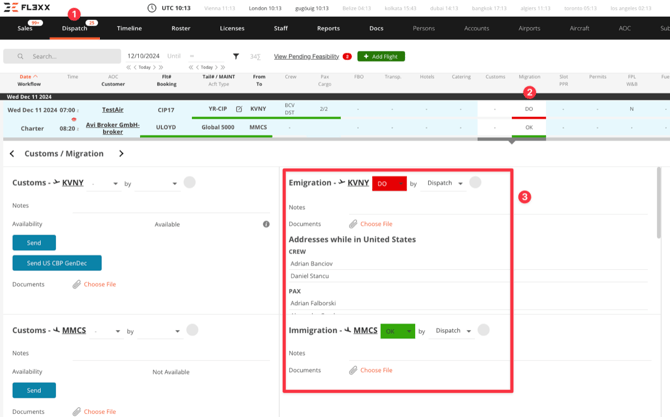
FL3XX displays all the required fields that must be completed for CBP compliance before submitting an eAPIS.
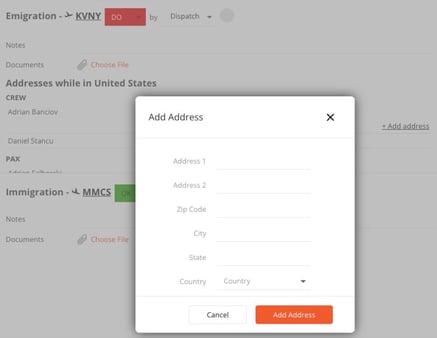
- Add the addresses for crew and passengers if required by CBP.
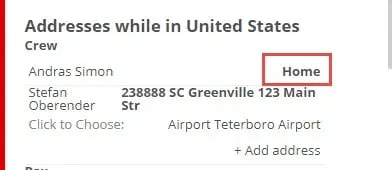
- If a passenger or crew member has a US home address, the word "Home" will appear. You can click on it to select the address.
- If a passenger or crew member does not have a US address, first click on their name, then select "+ Add Address" to enter the required details. These addresses will be saved for future eAPIS submissions (i.e. for Canadian citizens previously onboard traveling to the U.S., dispatchers will be able to retrieve the previously used U.S. address that had been submitted from the customs/migrations panel).
- You add addresses for each passenger. There's no option to copy one address to other passengers.
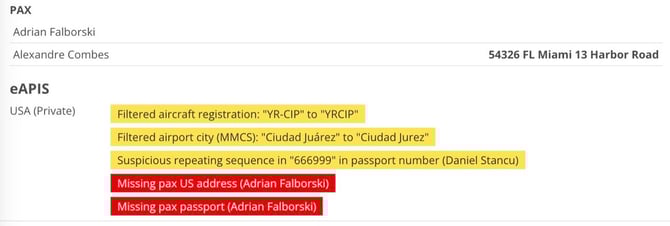
FL3XX may display yellow and red notifications, each serving a specific purpose:
- Yellow Notifications: These are informational alerts. For example, they might flag a suspicious repeating sequence in a passport number. While it's recommended to review these, they do not block the eAPIS submission.
- Red Notifications: These are critical alerts that prevent eAPIS submission. Missing or incorrect information must be corrected, and all red alerts resolved before the submission buttons become available.
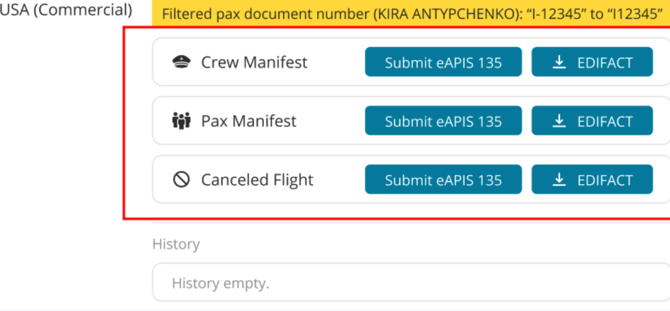
Finally, you can submit eAPIS. Press the button(s) to send Pax and Crew.
After submission, you can see the date, time, and confirmation number(s).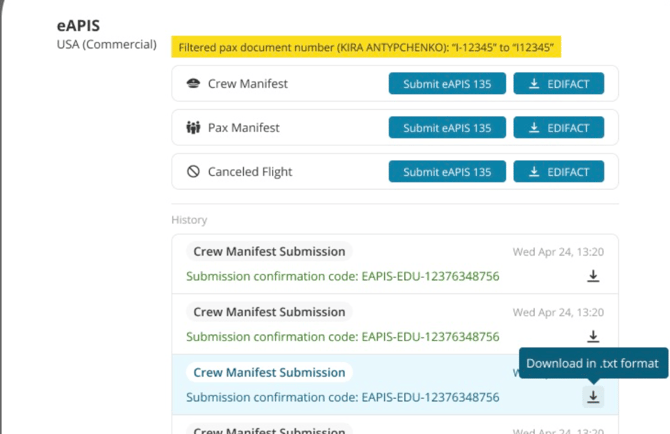
By clicking on the green submission confirmation, you can open a pop-up with crew and pax manifest details (combined for private; separate for commercial) and have the option to download a PDF.
You can cancel previous submissions if you are not operating this flight by clicking the “Submit eAPIS [...] – Cancelled Flight” button.
Activation
Contact FL3XX Support to activate.
This feature can only be activated if you have registered with CBP and have your Sender ID for Private Flights and the CBP carrier code for Commercial Flights.
Configuration
Once FL3XX support has activated US eAPIS (either Private/Part 91, or Commercial/Part 135, or both), you will see the settings in the System Settings / Integrations / APIS CBP TSA section.
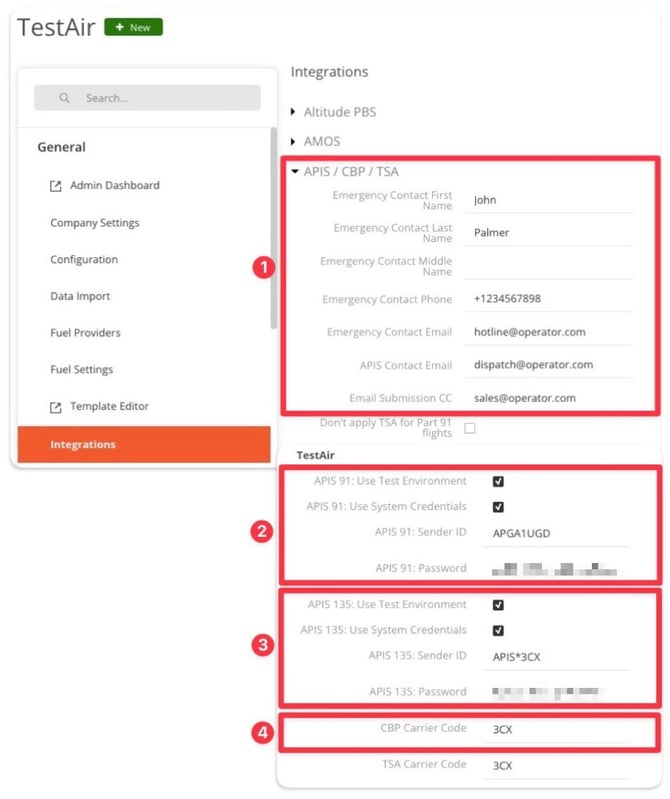
- Fill in your contact details as required by CBP:
- Emergency contact details
- APIS Contact Email
- Email Submission CC: CBP will send their submission confirmations in cc
- Set your Private/Part 91 eAPIS (this option will only appear if it is available to you):
- APIS 91: Use Test Environment
- Enable this option if you want to test the feature. Submissions will be sent to CBP's test environment, serving as a simulation only—no actual eAPIS submission will occur.
- APIS 91: Use System Credentials
- ❗️This must be always enabled.
- APIS 91: Sender ID
- Your unique ID for Part 91 eAPIS assigned by CBP.
- APIS 91: Password
- Leave this field empty (FL3XX submits eAPIS through its system access to CBP as per setting 2b.
- APIS 91: Use Test Environment
- Set your Part 135 eAPIS (this option will only appear if it is available to you):
- APIS 135: Use Test Environment
- Enable this option to test the feature. Submissions will be sent to CBP's test environment, serving as a simulation only—no actual eAPIS submission will occur.
- APIS 135: Use Test Environment
-
- APIS 135: Use System Credentials
- ❗️This must be always enabled.
- APIS 135: Sender ID
- Leave this field empty (FL3XX submits eAPIS through its system access to CBP as per setting 2a.
- Leave this field empty (FL3XX submits eAPIS through its system access to CBP as per setting 2a.
- APIS 135: Password
- Leave this field empty (FL3XX submits eAPIS through its system access to CBP as per setting 2a.
- APIS 135: Use System Credentials
- ❗️ CBP Carrier Code
- Your carrier code for eAPIS assigned by CBP.
Next, ensure that your Flight Prefix, IATA, and ICAO are set up in your AOC in FL3XX. If you don't have IATA or ICAO designators, leave the fields empty.
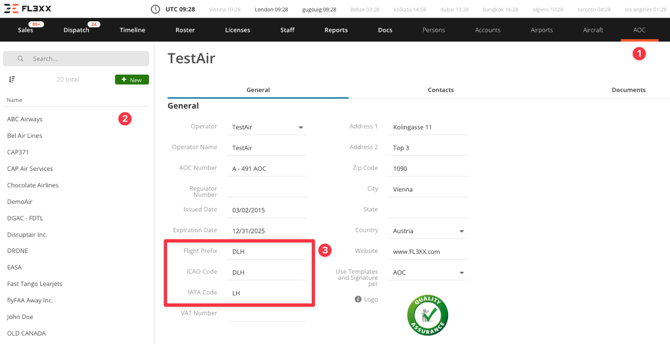
- Go to the AOC module.
- Select your AOC.
- Check and/or fill in your Flight Prefix, ICAO, and IATA designators.
FAQ
How can I cancel the submitted US eAPIS?
Private/Part 91
eAPIS does not currently have the option available to cancel a manifest once it has been submitted. For U.S. departures, it would not be necessary to contact CBP if you decide to cancel the flight or you are departing at a time different than first reported. For U.S. arrivals on the same date as originally submitted, please contact the affected CBP Port of Entry airport about changes in time. For changes in date on U.S. arrivals, a new eAPIS submission is required. (Source - AOPA)
Commercial/Part 135
In the US eAPIS feature, there are buttons to submit cancelations for both crew and passengers.
Do we need to specify where the aircraft will cross a border (e.g. from Canada to the USA)?
No, FL3XX does this automatically under the hood.
Do I have to submit US eAPIS for the flights to and from Guam, Puerto Rico and the U.S. Virgin Islands?
- Guam: US eAPIS doesn't apply.
- Puerto Rico: US eAPIS doesn't apply.
- From US to USVI: No US eAPIS
- From USVI to US: US eAPIS does apply.