
ReFuelEU Aviation (EU Regulation 2023/2405) requires operators exceeding defined annual activity thresholds to report detailed fuel information, including locally uplifted fuel, required fuel, and Sustainable Aviation Fuel (SAF) purchase and allocation data.
FL3XX provides comprehensive ReFuelEU support through:
-
Web and Mobile fuel capture
-
Backend calculations and validation
-
Automated unit conversion
-
Union Airport detection by year
⚠️ Important Note
The regulation effective date (1 January 2025) is not system-enforced. Operators are responsible for activating the feature in line with their compliance obligations.
2. Web App – ReFuelEU Fuel Panel
4. Mobile Apps – ReFuelEU Fuel Panel
6. European Union Airport Detection
8. How to pull Fuel data from ForeFlight
1. Feature Activation
ReFuelEU functionality can be controlled by the following setting:
-
Settings → Fuel Settings → Enable Post Flight Extra Fuel Fields
When the toggle is OFF:
-
No ReFuelEU fields are shown
-
No Union airport flag is displayed
-
No local uplift percentage indicators are shown
When the toggle is ON:
-
All ReFuelEU fuel fields are shown
-
Union airport indicators are enabled
-
Local uplift percentage logic is enabled
2. Web App – ReFuelEU Fuel Panel
The ReFuelEU Panel can be found under:
-
Dispatch → Post Flight → Fuel
The Web App contains the full ReFuelEU fuel section, grouped into four areas:
- Safety Fuel Information
- Uplifted Fuel (EU-purchased)
- Fuel Reporting Data (SAF purchases)
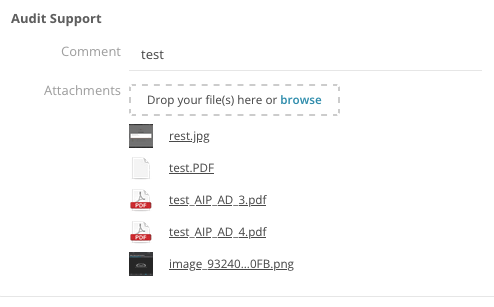
- Audit Support
These four areas are explained in detail below.
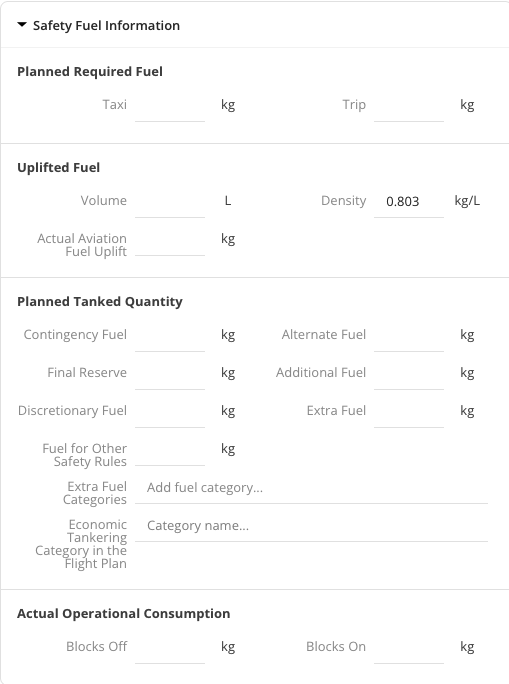
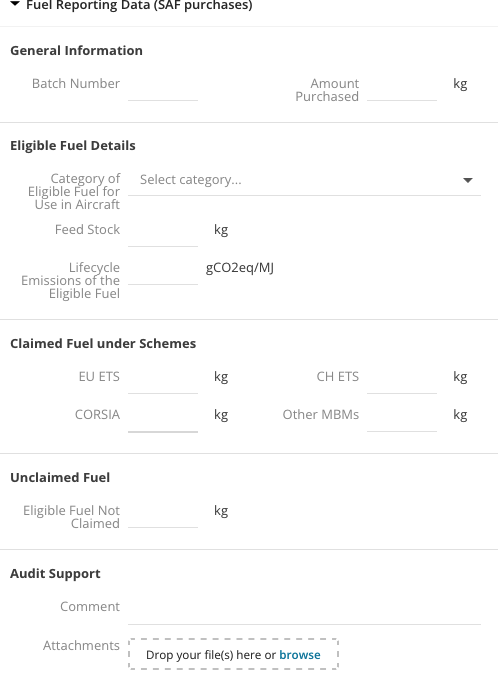
2.1 Safety Fuel Information (Planned & Actual)
All operational fuel values are entered using the aircraft’s Fuel Burn Unit (FBU) (lb, kg, or L).
Fields:
-
Taxi Fuel
-
Trip Fuel
-
Contingency Fuel
-
Alternate Fuel
-
Final Reserve
-
Additional Fuel
-
Discretionary Fuel
-
Extra Fuel (multi-select):
-
Holding
-
Weather
-
Operational
-
Tankering Commercial
-
-
Fuel for Other Safety Rules
-
Economic Tankering Category (free text)
-
Block Off Fuel
-
Block On Fuel
Required Fuel (System Calculated)
The required fuel is calculated by the backend as follows:
-
Taxi + Trip
The following items are not included in the Required Fuel calculation:
-
Extra Fuel
-
Fuel for Other Safety Rules
This logic is fixed and executed by the backend.
2.2 Uplifted Fuel (EU-Focused)
Fields:
-
Uplift Volume
-
Density
-
Actual Aviation Fuel Uplifted
Auto-Copy Logic (Backend)
The system automatically copies the following values from the Departure Uplift section:
-
Unit
-
Density
-
Total uplifted fuel
💡 Uplift volume
Uplift volume = Departure uplift volume + Arrival uplift volume
Rules:
-
Editing the Departure Uplift overwrites the ReFuelEU uplift fields.
-
Editing the ReFuelEU uplift fields does not overwrite the Departure Uplift.
This applies to both the Web and Mobile apps.
2.3 Fuel Reporting Data (SAF Purchases)
These fields capture SAF purchase and allocation data as required for regulatory reporting.
Fields:
-
Fuel Supplier
-
Batch Number
-
Fuel Quantity (physical quantity, not currency)
-
Category of Eligible Fuel
-
Feedstock
-
Lifecycle Emissions (gCO₂eq/MJ)
-
Claimed Fuel under EU ETS
-
Claimed Fuel under CH ETS
-
Claimed Fuel under CORSIA
-
Claimed Fuel under other MBMs
-
Unclaimed Fuel
All quantities are entered in the aircraft’s Fuel Burn Unit (FBU) and converted for reporting.
2.4 Audit Support
-
Free-text comments
-
File attachments (receipts, NOTAMs, supplier documents, photos)
3. Calculated Fields
3.1 Local Uplift Percentage (Union Airports Only)
Calculated by the system:
-
(Local Uplift ÷ Required Fuel) × 100
Applicability
This is only calculated and displayed for Applicable Union Airports when the feature toggle is ON.
Status Indication (UI Severity Only)
-
≥ 95% → Compliant (no warning)
-
< 95% and ≥ 90% → Yellow (non-compliant)
-
< 90% → Red (severe non-compliance)
Compliance message (static, both yellow and red):
Union Airport: locally uplifted fuel should be minimum 95%.
⚠️ No penalty amount is shown in this release.
3.2 Unit Conversion (Reporting)
Operational entries use the aircraft’s units. All authority reporting uses tonnes.
The conversions are calculated as follows:
-
lb → tonnes: value ÷ 2204.62
-
kg → tonnes: value ÷ 1000
-
L → tonnes: (value × density) ÷ 1000
Default density in FL3XX BRIGHT (if missing): 0.803 kg/L
4. Mobile Apps – ReFuelEU Post Flight Panel
The Mobile Apps mirror the Web App and support in-flight and post-flight data entry. All ReFuelEU fields are available when the feature toggle is enabled.
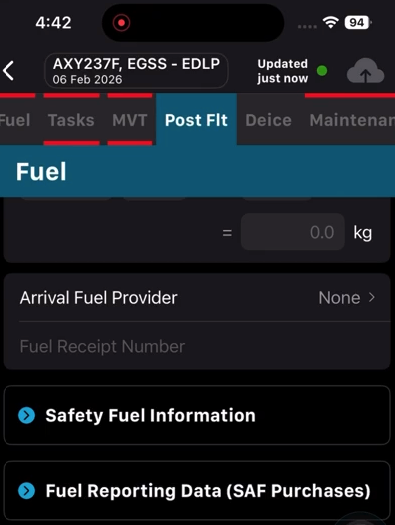
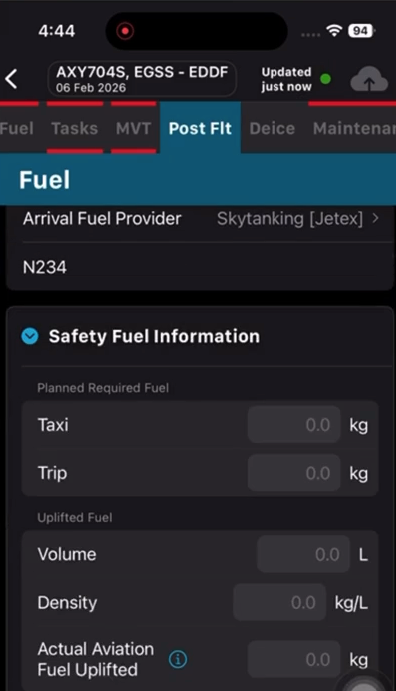
Supported Fields
Safety Fuel:
-
Taxi, Trip, Contingency, Alternate, Final Reserve
-
Additional, Discretionary
-
Extra Fuel (multi-select)
-
Fuel for Other Safety Rules
-
Economic Tankering Category
-
Block Off / Block On
Uplifted Fuel:
-
Volume
-
Density
-
Actual Aviation Fuel Uplifted (auto-copied)
SAF Data:
-
Supplier
-
Batch
-
Fuel Quantity
-
Category
-
Feedstock
-
Lifecycle Emissions
-
Claimed / Unclaimed allocations
Audit:
-
Comments
-
Attachments (photos and files)
5. Synchronization Rules
-
All calculations and validations are executed in the backend
-
The Web and Mobile apps remain in real-time sync
-
Departure Uplift → ReFuelEU is a one-way synchronization
-
Edits to ReFuelEU do not overwrite the Departure Uplift
6. European Union Airport Detection
EU airports are identified using an official, hardcoded EU list. Each list includes:
-
ICAO
-
IATA
-
Airport name
-
Country
-
Applicable year
The correct list is selected based on the flight departure date.
The Union flag and uplift percentage are displayed only when:
-
The airport is on the applicable list
-
The feature toggle is ON
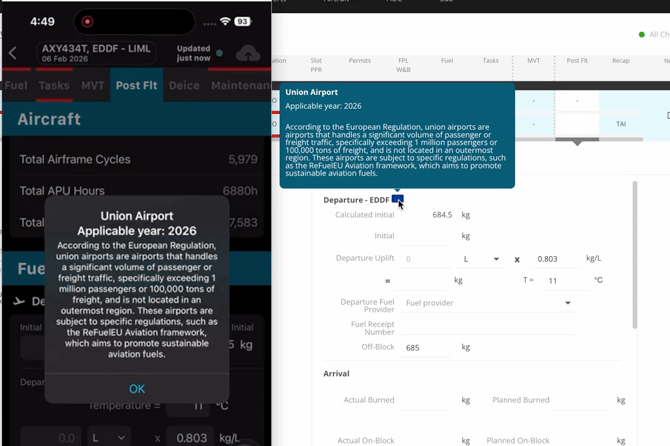
7. Attachments
Attachments sync across platforms and are retained for audit purposes. The following file types are supported:
-
Photos
-
PDFs
-
Documents
8. How to pull Fuel data from ForeFlight
More info here:
https://www.fl3xx.com/kb/foreflight