
US Recency Variations and Simplifications
EFVS (Enhanced Flight Vision System) Recency Tracking
Recency
US Recency Calculations
Three conditions are tracked automatically by FL3XX based on FAA regulations 61.57 and 135.247:
- PIC Day Recency
- PIC Night Recency
- IFR Approach Recency
1. PIC Day Recency:
- Requirement: 3 takeoffs and landings in the last 90 days.
- Applies to: Aircraft of the same category/class/type or Simulator.
- Note: For informational purposes only, it is not included in the Recency calculation. Labeled as: [AC Type] - PIC (90d) 3 Day TO/Ldg.
2. PIC Night Recency:
- Requirement: 3 night takeoffs and landings in the last 90 days.
- Applies to: Aircraft of the same category/class/type or Simulator.
- Note: Completing Night Currency also satisfies Day Currency. Labeled as:
[AC Type] - PIC (90d) 3 Night TO/Ldg.
3. Alternate Night Currency (1,500 Hours):
A crew member with 1,500+ hours can satisfy Night Currency by:
- Satisfying Day Currency, AND
- Logging:
- 15h flight time on type in the last 90 days, AND
- 3 night takeoffs and landings in a turbine-powered aircraft in the last 6 months
OR - Completing a part 142 training program, including:
- 6 night takeoffs and landings in a simulator within the last 12 months.
- Labels:
- [AC Type] - (90d) 15 Block Hours
- PIC (6m) 3 Night Turbine TO/Ldg
- Part 142 (12m) 6 Night TO/Ldg.
4. IFR Approach Recency:
- Requirement: 6 precision approaches and 1 holding in the last 6 months.
- Labeled as: (6m) 6 IAP.
5. SIC Requirements:
While the above rules apply to the PIC, the SIC only needs:
- Requirement: 3 takeoffs and landings in the last 12 months.
- Labeled as: [AC Type] - SIC (12m) 3 TO/Ldg.
There are also variations from these original requirements implemented (contact support for more info)
Recency data for night and day take-offs/landings and instrument approaches is prominently displayed on the Staff page.

US Recency Conditions V2
A simplified version for operators who do not qualify for alternate night landing currency. Tracks day and night currency separately.
- PIC: 3 day takeoffs & landings + 3 night takeoffs & landings
⚠️ Important: SIC recency is not supported in V2. If a pilot is assigned as SIC under a qualification using V2, recency will not calculate — even if the "Show Recency" checkbox is enabled. If you need SIC recency tracking, switch to V3, V4, or V6.

US Recency Conditions V3
Expands requirements for SIC positions operating under Part 135 and Part 91. Applies the same calculation logic used for PIC tracking.
- PIC: Same logic as Original (6 night T/O & Ldg in 12 months)
- SIC: 3 takeoffs & landings in 12 months + 3 night T/O & Ldg in 90 days + 3 day T/O & Ldg in 90 days + 6 IFR approaches in 6 months
US Recency Conditions V4
(PIC + SIC + Part 142)
A comprehensive version that establishes distinct requirements for each position and incorporates Part 142 training center compliance.
For PIC only:
• 15 Flight Hours in the last 90 Days
• 3 Day Take-Offs and Landings in the last 90 Days
For SIC only:
• 3 Take-Offs and Landings in the last 12 Months (Day or Night)
For BOTH PIC and SIC:
• Part 142 Check completed within the last 12 Months
• Automatically satisfied via SIM-tagged duties in the Roster
• The Completed Date of the SIM will reflect in the “Part 142” recency item
• Only Landings (not IAPs) count – both Day and Night
US Recency Conditions V5 (Military / Tanker)
Designed for military operators and those conducting aerial refueling (AAR) operations. Requirements are tightened to a 6-month window to reflect mission-critical currency standards.
- SIC: 3 takeoffs & landings in 6 months + 6 IFR approaches in 6 months + tanker/AAR currency in 12 months
US Recency Conditions V6 / V6 SP
The most current general-purpose US recency version, combining landing currency with IFR approach requirements.
- SIC: 3 takeoffs & landings in 12 months + 6 IFR approaches in 6 months
V6 SP is a special-purpose variant of V6 with the same SIC requirements — contact FL3XX support if you are unsure which applies to your operation.
-
All recency items use the same underlying logic as existing US Recency Conditions (colour indicators, expiry, tooltip summaries).
Choosing the Right Version
|
Version |
SIC Supported |
IFR Approaches |
Night Currency |
Part 142 |
Military/AAR |
|---|---|---|---|---|---|
|
Original |
✓ |
— |
✓ |
— |
— |
|
V2 |
✗ |
— |
✓ |
— |
— |
|
V3 |
✓ |
✓ |
✓ |
— |
— |
|
V4 |
✓ |
— |
— |
✓ |
— |
|
V5 |
✓ |
✓ |
— |
— |
✓ |
|
V6 / V6 SP |
✓ |
✓ |
— |
— |
— |
If you are unsure which version is right for your operation, reach out to your FL3XX Customer Success contact.
EU Recency Calculations
EU Recency Calculations are based on a calculation of 3 Landings on Type within the preceding 90d.
Canadian Recency
Canadian Recency V1
This recency type consists of 3 take offs and 3 landings in the last 90 days, and
5 night Take offs and 5 night landings in the last 6 months

Canadian Recency V2
This version introduces a new element to be tracked: 6-month Instrument Approach Proficiency (6m IAP).
Requirements:
- 6 hours of instrument flight time within the last 6 months.
- 6 instrument approaches completed within the same period.
Tracking Options:
- Instrument flight time and approaches can be logged from either:
- Pilot Flying (PF) time, or
- Simulator (SIM) sessions.
Australian Recency
Australian Recency V1
Passenger Flights (Considered as "N" in FL3XX):
- Requirement: 3 day and 3 night take-offs and landings within the previous 90 days.
- Note: Includes data from both actual flights and simulator sessions.
Other Flights:
- Requirement:
- Record instrument flight activity to ensure:
- Completion of an Operator Proficiency Check (OPC) in a simulator (SIM), or
- At least 3 instrument approaches conducted within the previous 90 days, either in-flight or in a SIM.
- Record instrument flight activity to ensure:
Australian Recency V2
Ignoring the landings on a specific type, instead calculating any landing towards recency requirements.
Australian Recency V3
-
3 day and 3 night take-offs and landings within the previous 90 days, where the Night recency covers the Day recency, maintained by either:
-
-
3 night take-offs and landings in 90 days, or
-
1 Night Check:
-
Single sector
-
Conducted with a Check Captain
-
Resets night recency for 90 days even if only one take-off and landing is completed
-
-
-
- At least 3 instrument approaches within previous 90 days where:
- At least 1 × 2D – CDI approach
- At least 1 × 2D – Azimuth approach
- At least 1 × 3D – CDI approach
EFVS (Enhanced Flight Vision System) Recency Tracking
FL3XX offers the ability to track and update EFVS (Enhanced Flight Vision System) recency if required.
Activation
To activate this feature, follow these steps:
-
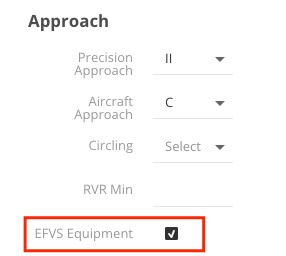
Activate EFVS Equipment
- Navigate to the Aircraft page under the Approach section.
- Enable the EFVS Equipment option for each aircraft that meets the required criteria.
-
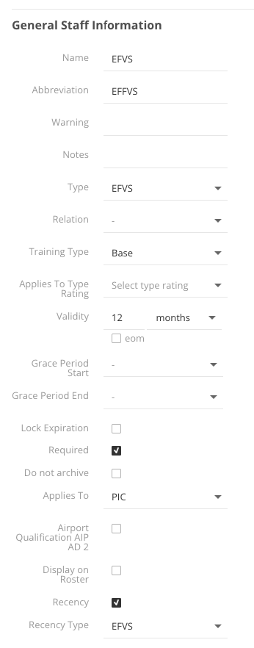
Set Up EFVS in the Qualifications Tree
- Create an EFVS item in the Qualifications Tree.
- Select the Type as EFVS and the Recency Type as EFVS as well.
- Define the required validity and check the Required box if warnings should be issued when criteria are not met.
- Save the changes and update caches.
-
Assign EFVS to Crew Members
- Add the newly created EFVS item to the crew members who require this recency tracking.
- Once added, a new recency panel item (e.g., "xx m EFVS", where xx represents the validity period) will appear.
- This item will automatically update based on data logged from Post Flight reports.

Log EFVS Approaches in Post Flight
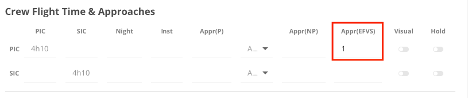
- For aircraft with EFVS enabled, a new field called “Appr(EFVS)” will appear in the Post Flight Approach Details section.
- Use this field to mark approaches conducted using EFVS.
System Recency Calculation
- The system will process EFVS approach data from Post Flight logs and calculate it toward meeting EFVS recency requirements.
Simulator Recency Calculation
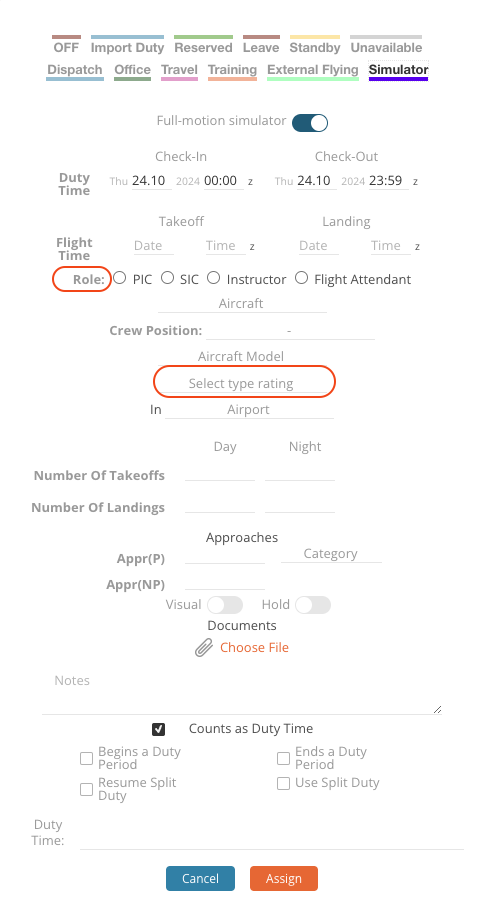
In the Roster Module, for each past SIM event recorded, we will calculate one approach and one hold for recency purposes as long as landings and the type rating are added. This calculation remains consistent regardless of the number of landings that have been entered into the system.
To ensure you can effectively review and analyse your flight data, it is important to select the appropriate role within the SIM event. By doing so, you will be able to accurately check the type of approach performed by navigating to : Reports - Crew - Logging Report.
Manual Recency Update
The expiry date for Recency Items can be entered manually. This is useful especially when a new pilot joins the company. As soon as enough data points for a calculation are available and the calculated Recency is further in the future than the manually entered one, the system will override the manually entered value and calculate the Recency automatically.
If the Recency is entered manually, the font appears in blue and a note “manual entry” is displayed.
If the Recency is calculated automatically, the font is black and a note “calculated” is displayed.
Note: we include both precision and non-precision approaches when calculating pilot 6IAP recency.