About
FL3XX separates a person’s Profile status (used for operational workflows) from Login access status (controlled by email verification). This approach ensures staff members remain usable in the system (e.g., for crew assignment) even when they cannot yet log in.
3. Active Profile + Email Not Verified is a Supported State
4. Deactivation Does Not Change The Profile Status
1. Profile (Person) Status
“Can this person be used in operations?”
A person profile has one of the standard statuses:
-
Active (green) – usable in operational workflows (roster, flights, reports, etc.)
-
Inactive (yellow) – profile is inactive for operational usage (depending on your internal processes)
-
Deleted (red) – profile removed / not usable
⚠️ Important
Profile status relates to the person record and its usability within system functions, not the login access.
2. Login Access
“Can This User Sign in?”
Login access is controlled separately via email verification:
-
Email Verified → user can log in (assuming access rights are assigned and login is enabled)
-
Email Not Verified / Pending → user cannot log in until verification is completed
(but their profile can still be Active and usable operationally)
⚠️ Important
Login access relates to authentication and security, not to whether a person can be assigned to flights.
3. Active Profile + Email Not Verified is a Supported State
A user can be:
-
Profile: Active
-
Login: blocked until email is verified
In this state, the user:
-
✅ Can be selected on Staff/Roster
-
✅ Can be assigned to flights as crew
-
✅ Appears in relevant lists/reports
-
❌ Cannot log in until email verification is completed (or manually activated by an admin)
The ability to log in is the only difference compared to a fully active user.
4. Deactivation Does Not Change The Profile Status
If the system disables login access (e.g., inactivity rules / admin action), it will:
-
NOT switch the profile to Inactive
-
KEEP the profile as it is at the moment of change (i.e. remain Active)
-
REMOVE login access by putting the account back into “Email verification required” state
This means:
-
The person remains operationally usable,
-
but must complete verification again (or be manually activated, if the operator’s internal processes allow this).
5. Common Scenarios
Scenario A: New user created but email not verified yet
-
Profile remains Active
-
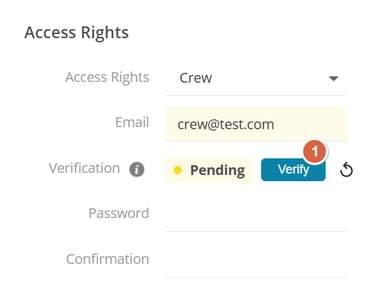
AccessRights/Login shows Pending verification
-
User can be assigned to flights, but cannot log in
Scenario B: Person (non-login) transformed into an access user
-
Profile keeps its current status (usually Active)
-
If email not verified → pending verification indicator is shown
-
Verification email is sent automatically after saving (per configuration)
Scenario C: Login deactivated by inactivity
-
Profile stays Active
-
Login access is removed by returning user to verification required
-
User remains usable for operational workflows
6. FAQ
Why is someone Active but cannot log in?
Because Profile status controls operational usability, while login depends on email verification.
Can an Active + Pending Verification user be crew on a flight?
Yes. They behave like any Active profile for operational features.
Can we bypass email verification?
Only if your operator has enabled option for the admin to manually verifiy users - this setting can be enabled by FL3XX Support team.
Once the setting is enabled users with full access to Access Right section will have additional button to manually verify email for any of the staff [1]