
The Dispatch App now allows users to directly edit the status of various flight services such as Handler, Transport, Hotac, Catering, Customs, Migration, PPR, Permits, FPL, W&B, Fuel, or Release. This new functionality simplifies the process of managing service statuses, providing real-time updates and better coordination within the team.
Keeping Data Fresh in Flight Tabs
For the best reliability, all Flight tabs in the Dispatch App now include:
- Pull-to-refresh: Pull down on any tab to manually update content, header statuses, and related items (e.g., Expenses) from the backend.
- Auto-refresh on resume: When resuming the app on a Flight tab, it automatically loads fresh data.
These ensure edits and views stay current, with no jumping animations or unnecessary alerts for your own changes.
How to Edit Flight Service Status:
-
Open the Flight Details:
- Select the desired flight in the Dispatch App and navigate to the relevant service tab (e.g., Handler, Transport, Hotac, Catering, Customs, Migration, PPR, Permits, FPL, W&B, Fuel, or Release).
-
Change the Status:
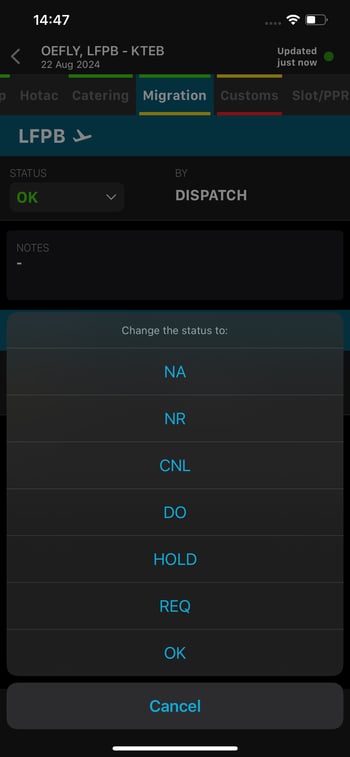
- Tap on the dropdown list (DDL) next to the current service status.
- Select a new status from the list: "NA," "NR," "CNL," "DO," "HOLD," "REQ," or "OK."
- Confirm your selection or cancel if necessary.
-
Edit Additional Fields and Add Attachments In supported tabs, you can now directly edit:
- Notes or Remarks (e.g., add comments or clarifications)
- Order (e.g., update catering specifics)
- Pax Remarks (where applicable, e.g., in Catering)
You can also upload attachments (e.g., confirmations, documents) where supported.
Supported tabs include:
- Handler/FBO: Remarks + Documents
- Transportation: Notes + Confirmation
- Hotac: Notes + Confirmation
- Catering: Order + Pax Remarks (if applicable) + Confirmation
- Slot/PPR: Notes
- Permits: Notes
- FPL: Remarks
- Fuel: Notes
- Customs: Notes, Remarks, Order + Attachments
- Migration: Notes, Remarks, Order + Attachments
Note: On the Customs tab, tap the info icon (arrival or departure) to open the Customs Info screen in full screen. The icon appears only when Customs Info data exists for that leg.
-
Real-Time Update and Sync:
-
Changes sync in real-time when online. Offline edits save locally (with visual indicators like orange borders for unsynced items) and automatically sync when connectivity returns. If conflicts occur (e.g., simultaneous edits), use the resolution options: Resolve using Mine, Their, or Manually.
-
Key Points:
- Permissions: In the Dispatch App, you have full editing access to Notes, Remarks, Order, Pax Remarks, statuses, and attachments — regardless of whether the service is assigned "By Crew" or otherwise. (This differs from the Crew App, where some fields are restricted.) Existing attachments/documents remain editable by anyone, as before.
- Offline Support: Expanded to include offline editing in additional tabs (e.g., FBO/Handler, Hotac, Transportation, Catering), beyond the original Slot/PPR, Permits, and W&B support.
- Consistency: All updates align perfectly with the web app — status changes, field edits, and attachments appear immediately across platforms.
- Performance: Recent enhancements maintain smooth app performance with no regressions, even with added syncable fields.