AIRCRAFT PRICING
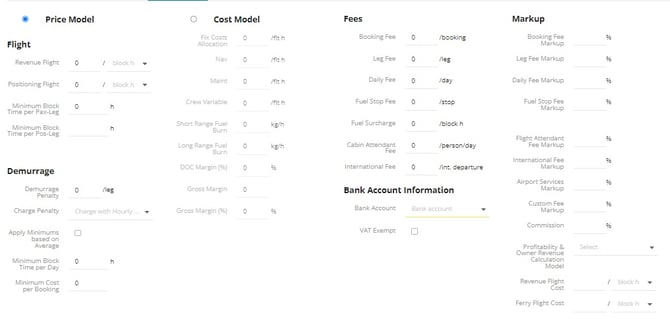
There is a choice in how to price your aircraft: Price Model vs. Cost Model.
Price Model is the more common choice for FL3XX customers. This considers price per hour in an "all-in" fashion. You are still able to add fees and custom line items on top of the hourly rate. If you choose Price Model, the green shaded rows are applicable. You also have the option of pricing per block hour or flight hour.
You also have the option to set minimums and demurrage - see FAQ section.
Cost Model breaks down cost-per-hour into separate categories (fixed cost, navigation, maintenance, crew variable, fuel burn) and then designates a target margin. If you choose Cost Model, the green shaded rows are not applicable.
Finally, you will identify the Bank Account your customers should send payment to, and (if applicable) enter to whom Handling Invoices should be sent to.
If you are interested in automated pricing with conditions, we encourage you to explore our Pricing Engine.
AIRPORT FEES
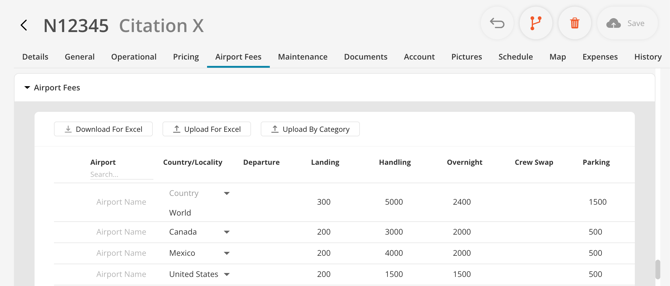
For larger operators, it is possible to set airport fees for your entire fleet or by category (light, medium, heavy). This is available via an excel download in the Aircraft module under Airport Fees. It is important to note the following when using our excel download:
A row is imported only if it identifies exactly one target:
-
Airport fee: Airport filled, Country empty
-
Country fee: Country filled, Airport empty
- World fee: Country = WORLD, Airport empty
You, of course, have the option to enter airport fees manually,
How does it work?
In addition to listing airports, you can also list World and/or Country rates. FL3XX pulls Airport Fees as such:
- FL3XX first looks for the specific airport in your Airport Fees database. If fees are set, it uses those figures.
- If fees for the specific airport are not set, FL3XX looks for the airport's country in your Airport Fees database. If fees are set, it uses those figures.
- If fees for the airport's country are not set, FL3XX then looks for world in your Airport Fees database. If fees are set, it uses those figures. (If not - fees default to 0).
One strategy would be to set these country "fall-back" fees for countries you have travelled to, and then compile the airport list:
| United States |
| Canada |
| Mexico |
| KJFK |
| KHPN |
If you haven't already, please consider our RDC Integration, which enters Airport Fees from RDC's database as you build your quotes!
MINIMUMS
You can set a minimum block time per passenger leg and positioning leg:
Minimum Block Time per Pax-Leg (h)
Minimum Block Time per Pos-Leg (h)
If the leg's block time is shorter than this minimum, the pricing will calculate as if it were at the minimum level.
For instance, if you have set a 1 block hour minimum on passenger legs and no minimum on positioning legs, this itinerary:
| KORD - KMOB | 2 pax | 1.5 block hour |
| KMOB - KMSY | 2 pax | 0.3 block hour |
| KMSY - KGPT | 0 pax | 0.2 block hour |
would be priced for 2.5 hours of passenger block time, and 0.2 hours of positioning block time.
DEMURRAGE
You can set a penalty for a low amount of block time per day over the course of an itinerary. Set the minimum amount of block time per day: Minimum Block Time per Day (h). We will then help you make the following choices:
- How much the penalty is
- Whether the itinerary's block hours should be averaged across days before applying this penalty
- Whether this penalty will apply in addition to the block hour minimums described in the previous section or not
Finally, you can set a minimum for the entire booking cost (a booking cannot be priced less than $XXXX): Minimum Cost per Booking.
HANDLING INVOICE
In outgoing Dispatch emails concerning handling and services, there is a section that indicates to whom invoices should be sent. It defaults to the operator.
Filling in this section overrides that default and establishes a different entity that should receive handling/services invoices.
Leave blank if the operator's contact info is the same as the contact info for receiving handling invoices.
PRICING PER AIRCRAFT